And Why I Only Install It on My Plex Server
Why you need Tailscale becomes obvious the moment you want secure, reliable access to your home network from anywhere without opening ports or exposing services to the internet. This post explains why you need Tailscale, and why I intentionally treat my Plex server as the only entry point into my network.
What This Post Is About and Why You Need Tailscale
This is not a step-by-step install guide.
This post focuses on why you need Tailscale from an architectural perspective, including tradeoffs and lessons learned the hard way.
- What problem Tailscale solves
- Why installing Tailscale on all devices caused problems
- How my Plex server became the gateway
- What I can manage remotely from my phone
Why You Need Tailscale for Remote Home Access
I run a small home setup: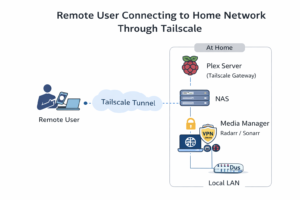
- A Raspberry Pi acting as my Plex server
- A NAS that stores all media and runs the torrent client
- A media manager box running Radarr and Sonarr
Why you need Tailscale in this setup is simple. I want to manage everything when I’m not home, from my phone, without port forwarding or risky firewall rules.
Why You Need Tailscale Instead of Port Forwarding
Tailscale creates a private, encrypted network between your devices.
Once connected, your device behaves as if it’s on the same local network, even when you’re far from home. This is the core reason why you need Tailscale for a homelab.
- No router configuration required
- No open ports
- No dynamic DNS
- Works behind CGNAT, hotel Wi-Fi, and mobile networks
What I Tried First Before Understanding Why You Need Tailscale
At first, I installed Tailscale on everything.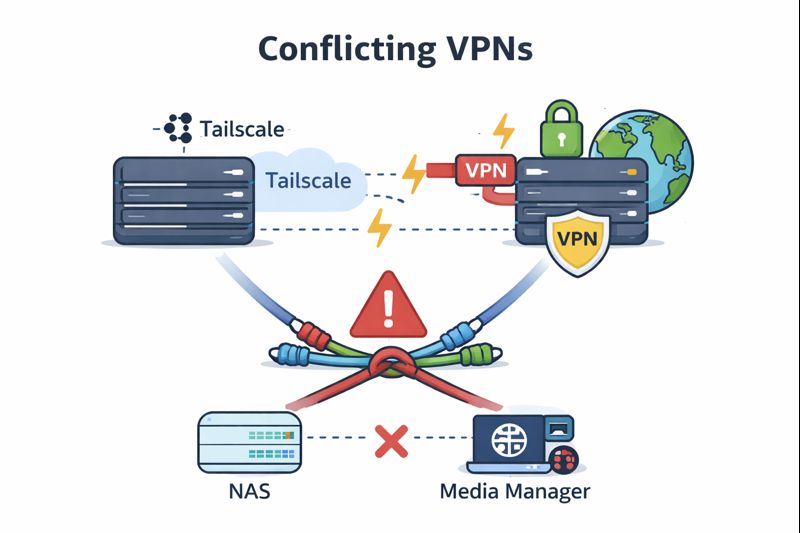
It was running on my NAS, my media manager, my Plex server, my Windows laptop, and my wife’s laptop.
At the beginning, this worked great. Everything could see everything else, and remote access felt effortless.
The problems started the moment I enabled my Private Internet Access VPN.
The NAS and the media manager both rely on the VPN for torrent traffic. Once Tailscale and the VPN were running at the same time, network routing became a mess.
Interfaces conflicted, default routes changed, and eventually both the NAS and the media manager completely lost internet access.
Nothing was partially broken. It was fully broken.
What seemed like a good reason why you need Tailscale everywhere turned into a lesson in why overlapping network tools don’t mix well without very careful planning.
Why You Need Tailscale as a Single Gateway
The solution was to stop installing Tailscale everywhere.
I removed it from all devices other than my Plex server.
This created a single point of entry into my network. All other devices are accessible through a terminal from my Plex server.
Real-World Example of Why You Need Tailscale
When we go camping with friends or stay at an Airbnb, someone inevitably suggests watching a movie that isn’t on Netflix, Disney+, or Prime.
Instead of giving up, I connect to my Plex server using Tailscale, open the Radarr webpage, and add the movie remotely. This real-world scenario perfectly shows why you need Tailscale in a home media setup.
Lessons Learned About Why You Need Tailscale
Just because you can install Tailscale everywhere doesn’t mean you should. I learned this the hard way by treating it like a blanket solution instead of a targeted tool.
Why you need Tailscale isn’t about maximum coverage or putting every device on a mesh. It’s about controlled access, predictable routing, and long-term reliability.
Running Tailscale alongside a full-time VPN on the same machines introduced unnecessary complexity. The VPN and Tailscale both wanted control over network routes, and that overlap caused real breakage instead of added security.
The biggest takeaway was to avoid stacking conflicting network tools unless you fully understand how traffic is being routed. In my case, separating responsibilities solved the problem: Tailscale for remote access, and the VPN for outbound traffic on specific machines.
Once I limited Tailscale to a single gateway device, everything became simpler, more stable, and easier to reason about. That design choice is ultimately why Tailscale works so well in my setup.
Wrap-Up: Why You Need Tailscale
If you want simple, secure remote access, why you need Tailscale is easy to answer.
One gateway device gives you flexibility without breaking the rest of your network.
Want to read more? Check out the home page!
1 thought on “Why You Need Tailscale”